 Teniee by TripOps · for travel agencies
Super-power your travel agency. Turn it into an AI-powered Super Agency.
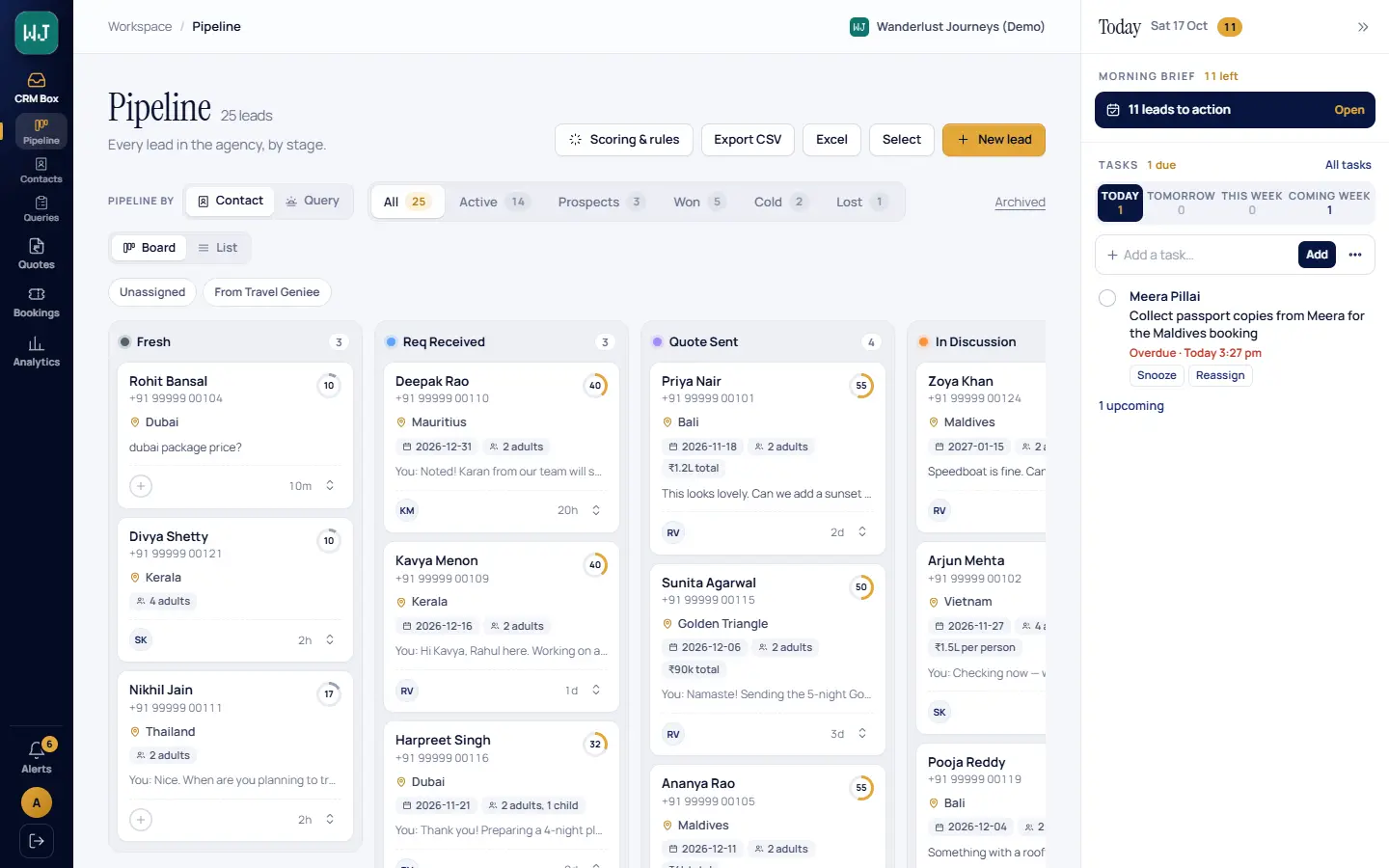
The only tool your agency needs to manage clients, quotations and bookings — for your whole team, on the WhatsApp number your customers already message: a CRM built in, a Lead Qualifier that greets every ad lead, a Briefer that tells each agent what to do every morning, an Itinerary Generator for day-wise plans, and quotes, bookings and tasks in the same place.
Demo login details are available from our team — ask us and we will share them.
- Keep your WhatsApp number
- Your whole team on one number
- Built on the official WhatsApp Business Platform
- ₹2,999 a month for 2 agents
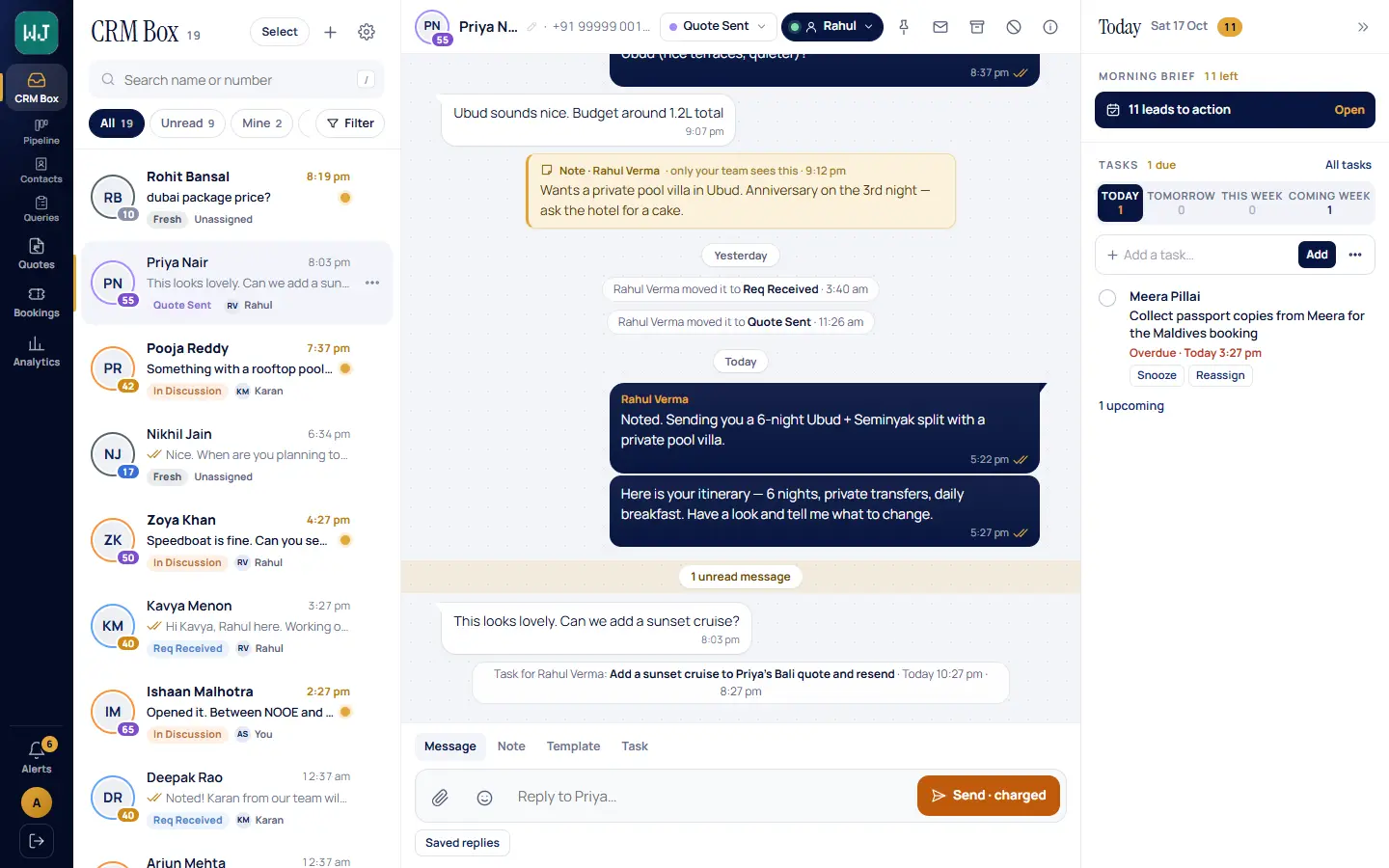
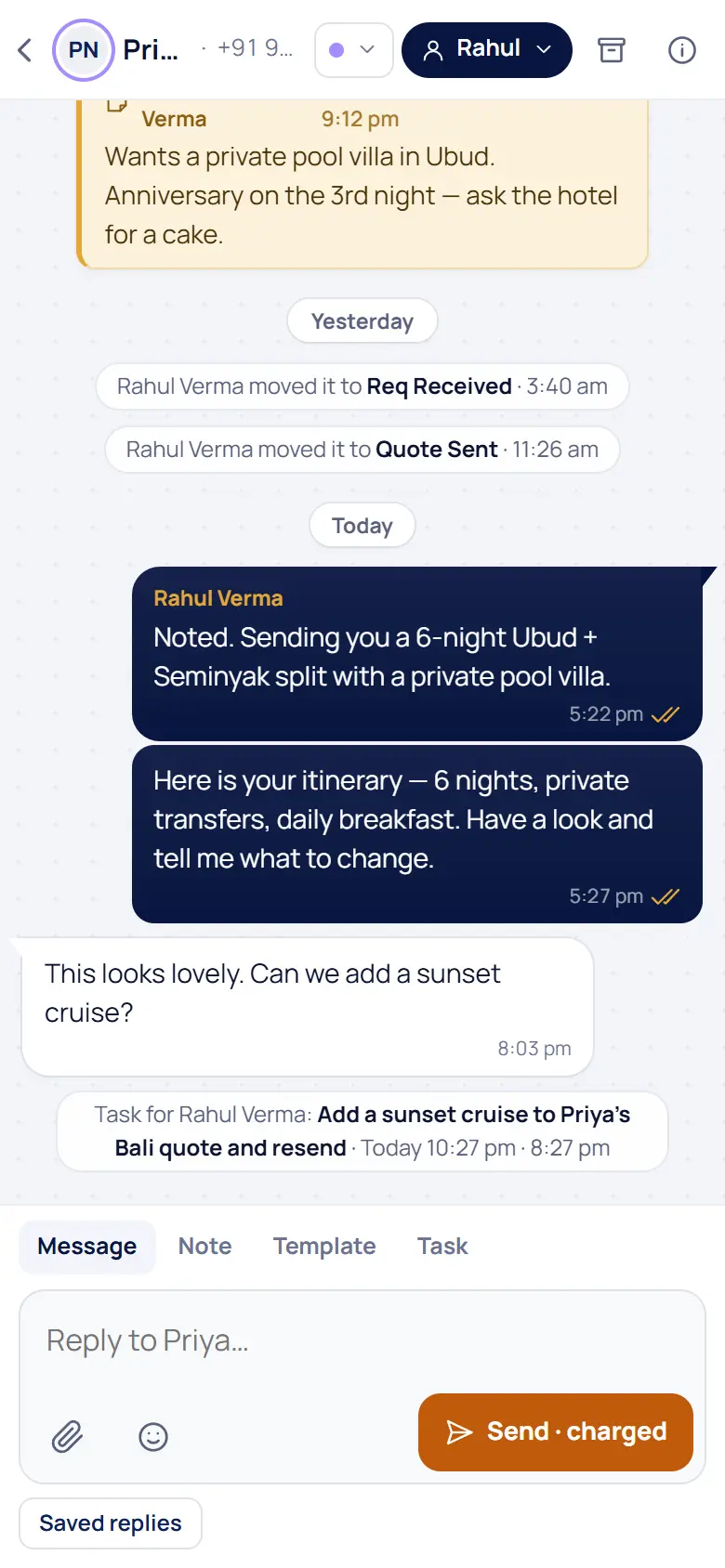
All-in-one
Everything in one place. The only tool your agency needs.
Replace the spreadsheets, the WhatsApp chaos and the separate CRM. Clients, quotations, bookings and the team’s day all live in TripOps.
One WhatsApp phone passed around the officeThe CRM Box: your whole team answers on one numberA separate CRM nobody keeps up to dateLeads, queries and scoring built in, filled in from the chatQuotes typed by hand in Word or a PDFBranded day-wise quotes: a mobile link and an A4 PDFItineraries rebuilt from scratch for every customerThe Itinerary Generator drafts them from your LibrarySpreadsheets for bookings, payments and GSTBookings, vouchers, balances and a GST exportFollow-ups on sticky notes and memoryTasks, a follow-up cadence and the morning Briefer
What changes
From travel agency to Super Agency
Four things change the day your team moves onto it.
Every lead answered
The Lead Qualifier greets ad leads on WhatsApp at any hour and captures the trip before a person picks it up.
Every agent knows what to do
The Briefer reads the day’s chats, quotes and tasks and hands each agent a list, lead by lead, every morning.
Quotes the same day
Day-wise, priced quotes with your branding — a mobile link the customer can accept and an A4 PDF.
Bookings without spreadsheets
The accepted quote becomes a booking, with vouchers, payments, margins and a GST export.
Your number
Keep your WhatsApp number
The number on your visiting cards, your ads and your Google listing stays yours. Bring it whichever way suits you.
Your existing WhatsApp Business App number
Connect the number you use today and keep using the WhatsApp Business app on the phone too. A reply typed on the phone shows up in TripOps, and a reply sent from TripOps lands in the same chat on the phone.
A new number
Starting fresh, or want a separate number for ads? Connect a new number and your whole team answers on it from day one.
Moving from another provider
Already on WhatsApp through another tool? We move the number over to TripOps with you, step by step.
The WhatsApp Business Account stays in your agency’s name. Using the phone app alongside TripOps changes a few things on the phone — we list every one of them before you connect: what changes on the phone app.
The Lead Qualifier
Your ads run all night. Now someone answers.
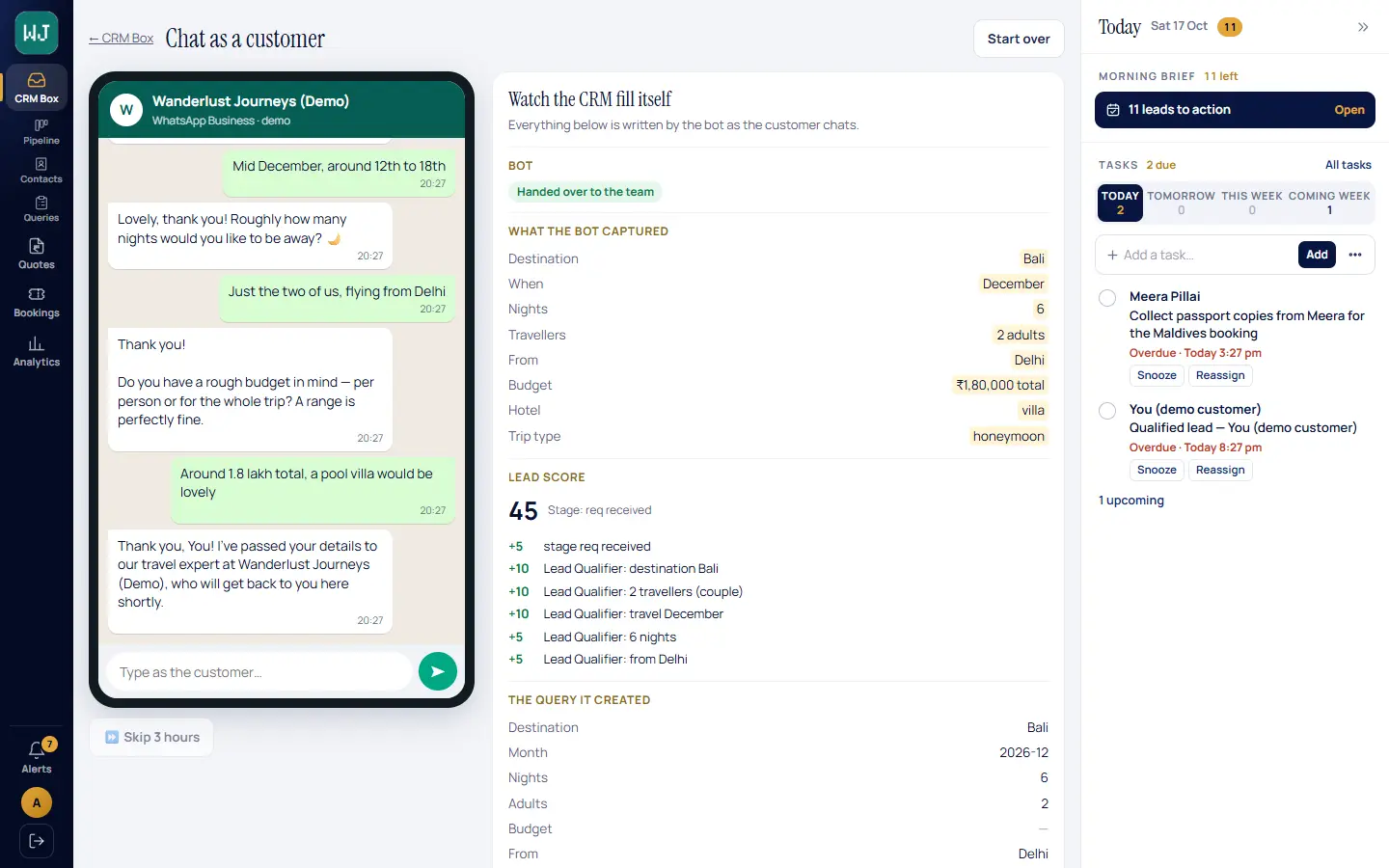
When a customer taps your click-to-WhatsApp ad, the Lead Qualifier greets them straight away, 24×7, and asks what a good consultant would ask — in a normal conversation.
- Captures the trip — destination, dates, number of travellers, departure city and budget.
- Builds the record — the lead, the query and a lead score fill themselves as the customer chats.
- Hands over hot leads — a “Qualified lead” task lands with the right person on your team.
- Steps aside — the moment one of your team replies, it stops talking in that chat.
The Briefer
Every morning, it tells you what to do for each lead.
Not just catering to leads — converting them. The Briefer reads your chats, quotes and tasks overnight and gives every agent a brief: who to reply to, who needs trip details, which quotes are waiting, who to follow up — each with a suggested message, ready to send.
Included in Standard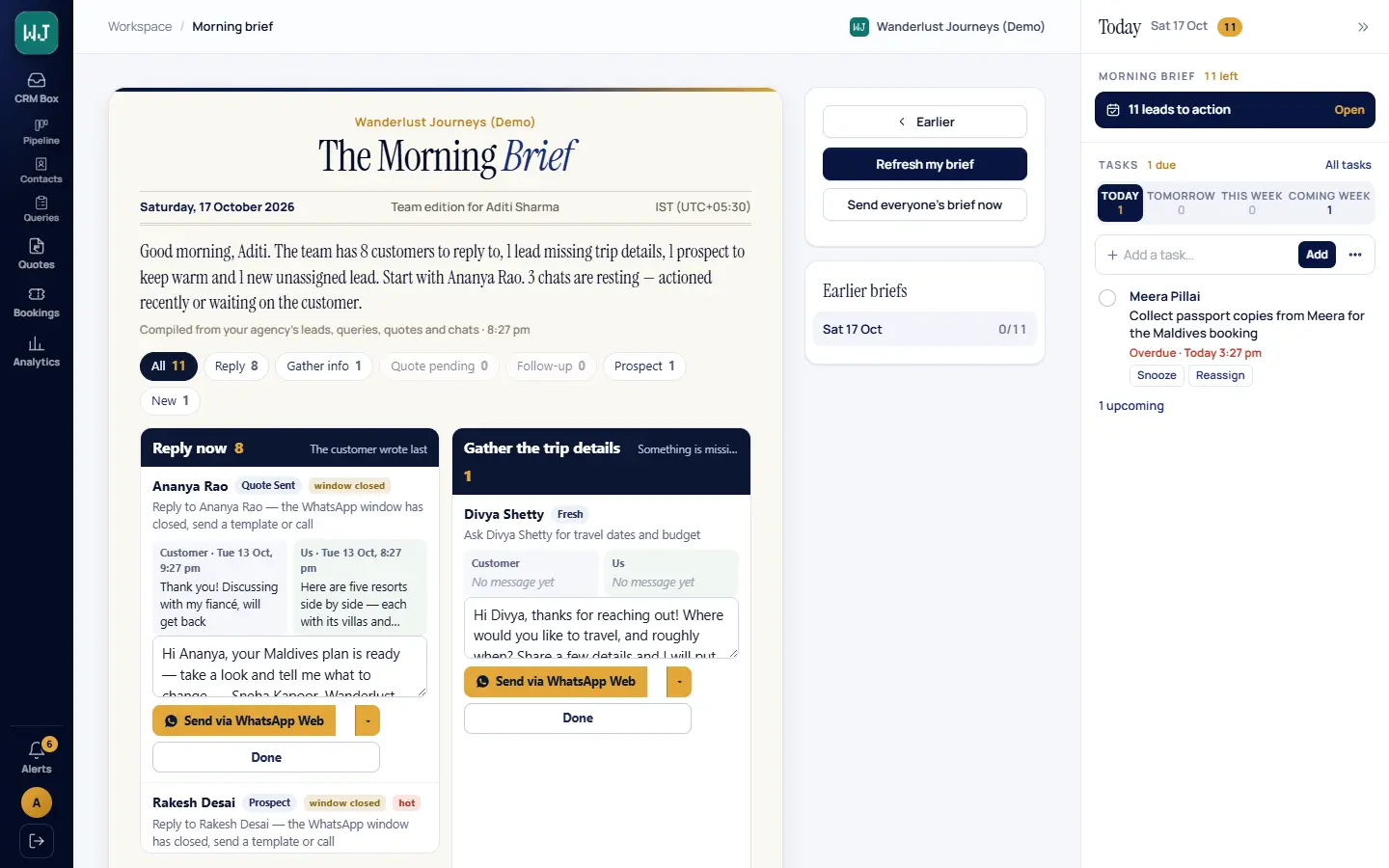
Who to reply to first
Customers who wrote last and are waiting on you are at the top of the brief.
Who is going cold
Lead scores decay when a lead goes quiet, so the cold ones sink and the live ones rise.
Follow-ups, spaced right
After a quote, follow-ups are scheduled at 2, 4, 7, 14, 30, 60 and 90 days — then a nudge to mark the lead cold. Your agency can change the steps.
Hot-lead scoring
Every lead gets a 0–100 score with the reasons, and its owner is alerted when it turns hot.
Itinerary Generator
Day-wise itineraries, drafted for your quotes.
Stop rebuilding the same Bali or Dubai plan for every customer. The Itinerary Generator drafts day-wise itineraries and packages for your quotes from the destinations and packages your agency already keeps in its Library.
Add-on · ₹500 per agency per month + ₹200 per additional agent · 100 packages per agent per month- 01
From your Library
Your destinations, packages and day plans — the content your team already curates.
- 02
A day-wise draft
The Itinerary Generator drafts the itinerary or package, day by day.
- 03
Into the quote
Your agent prices it and sends it as a branded quote — a mobile link and an A4 PDF.
Quotes
Quotes your customer can accept on the phone.
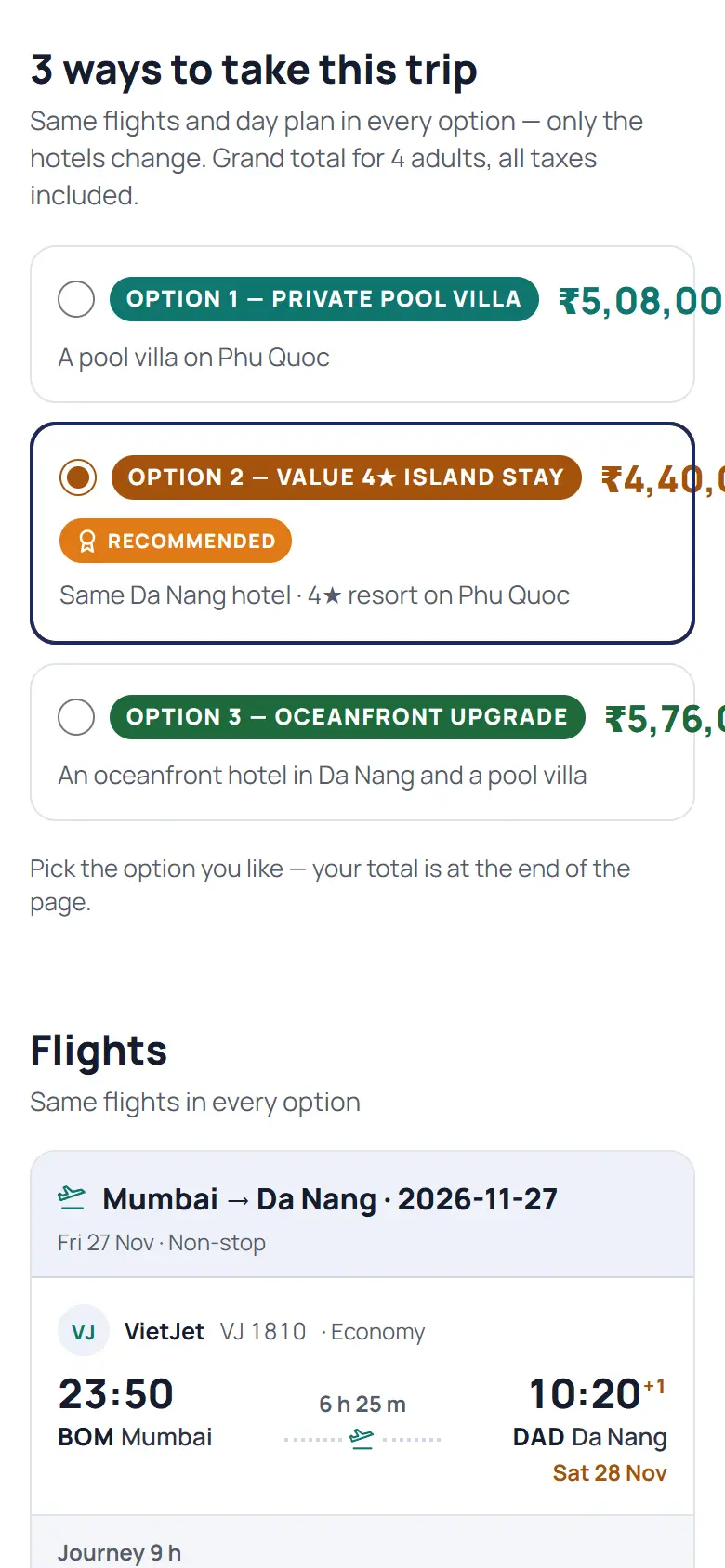
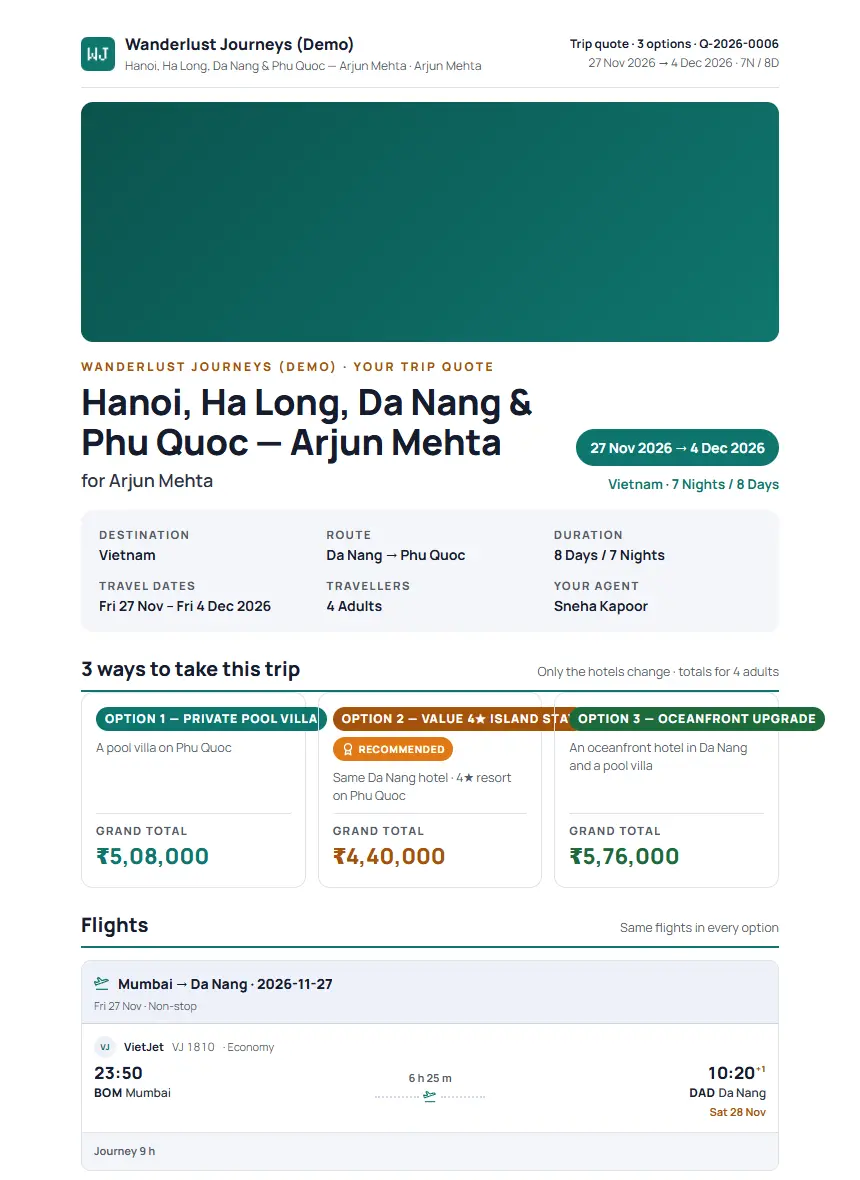
Build a day-wise, priced quote in three types — Regular, Multi Choice (several hotel options side by side) and Maldives / Mauritius resort quotes — and send it as a mobile link and an A4 PDF, in your branding.
- Hotels from a directory of over a million properties
- Flights read from a screenshot of the fare
- Packages and day plans from your Library
Bookings
Bookings, vouchers and the money
The accepted quote becomes a booking file: services, travellers and documents in one place, with sale, cost, margin and balances worked out for you.
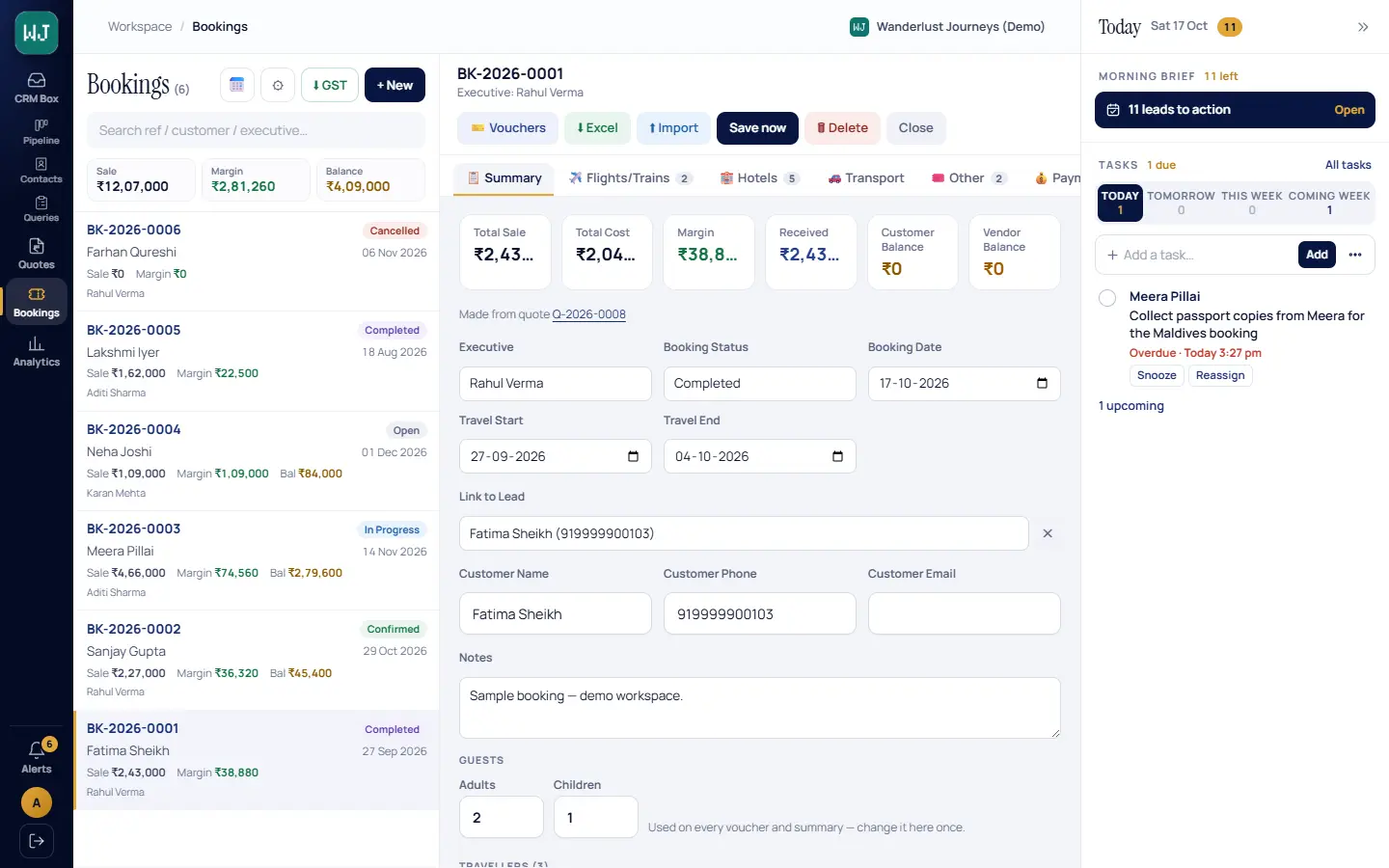
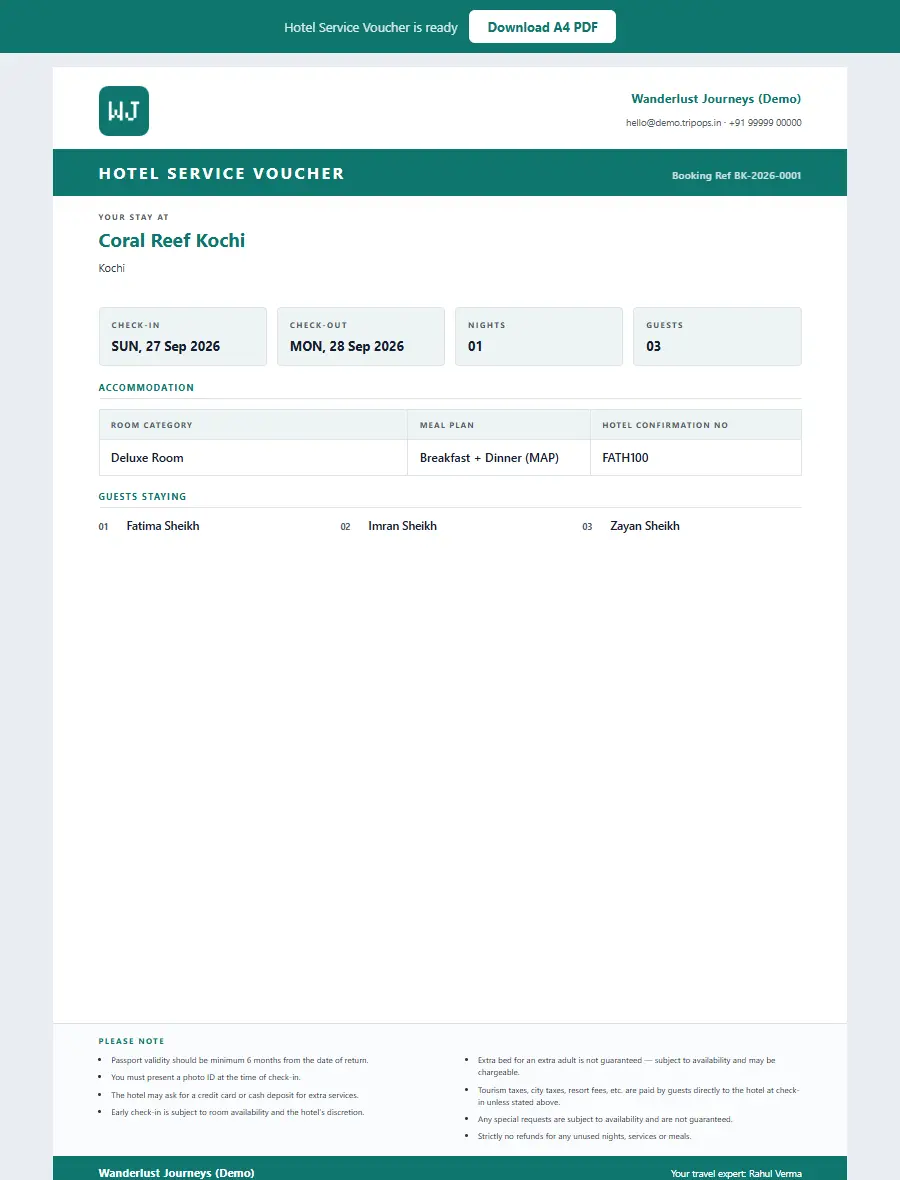
- Hotel, activity and booking vouchers as A4 PDFs
- Payments received, customer and vendor balances
- GST export and Excel export
- A calendar of departures
Tasks and analytics
Run the day, see the numbers
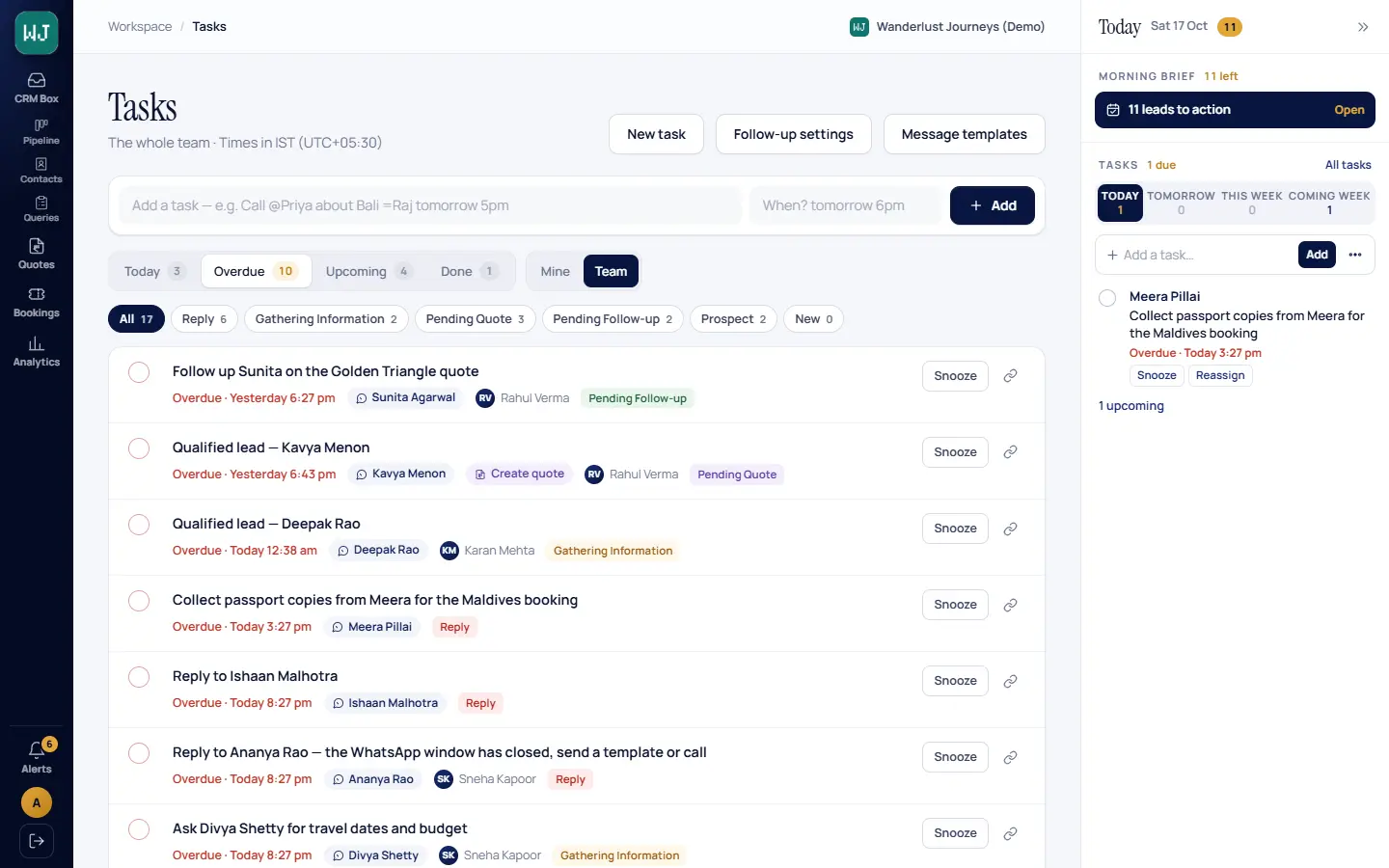
Tasks and the Today pane
Call-backs and follow-ups as tasks, typed in plain words, linked to the customer. The Today pane on every screen shows the brief and what is due.
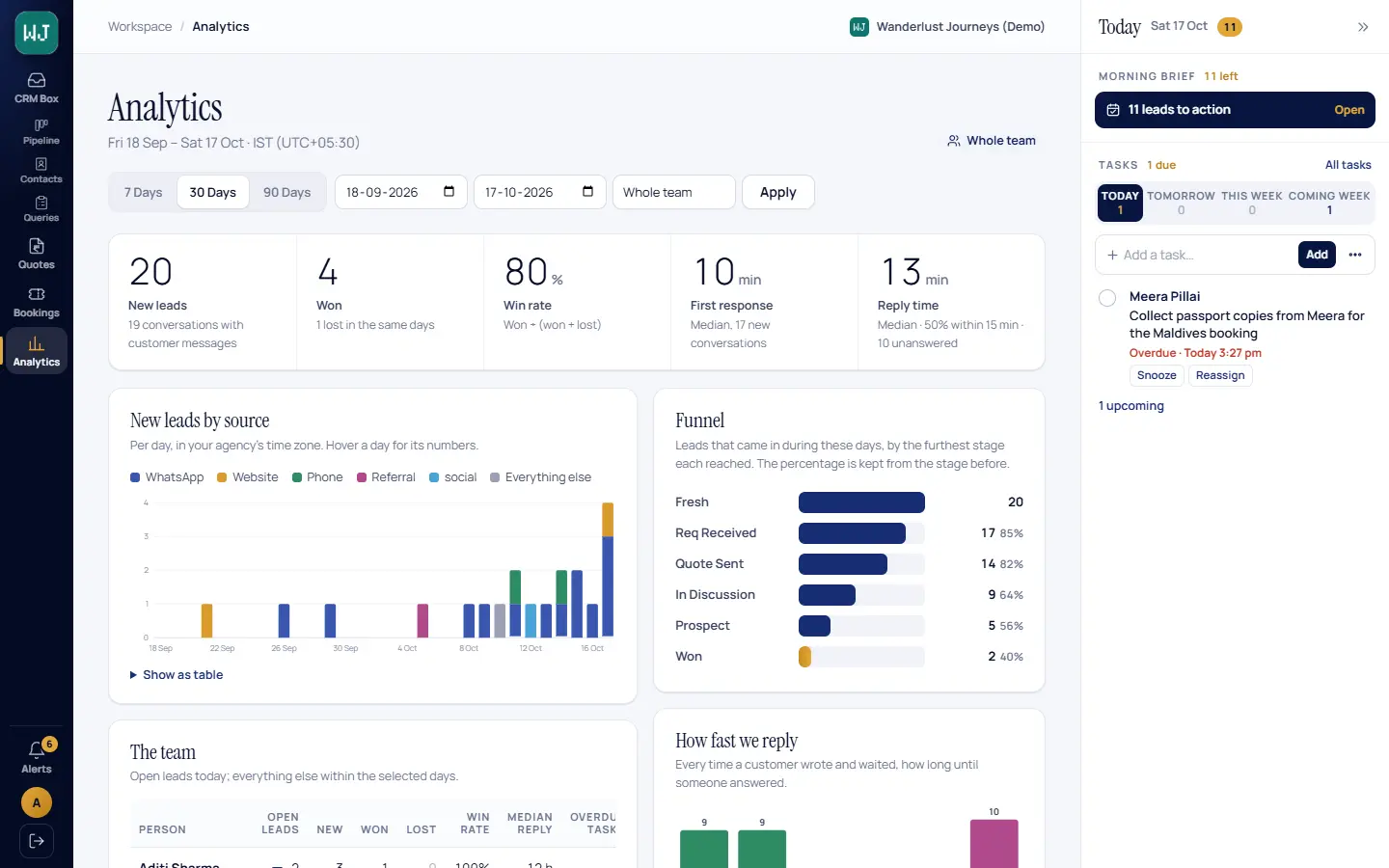
Analytics
New leads by source, win rate, first-response and reply times, and the funnel stage by stage — for you or the whole team.
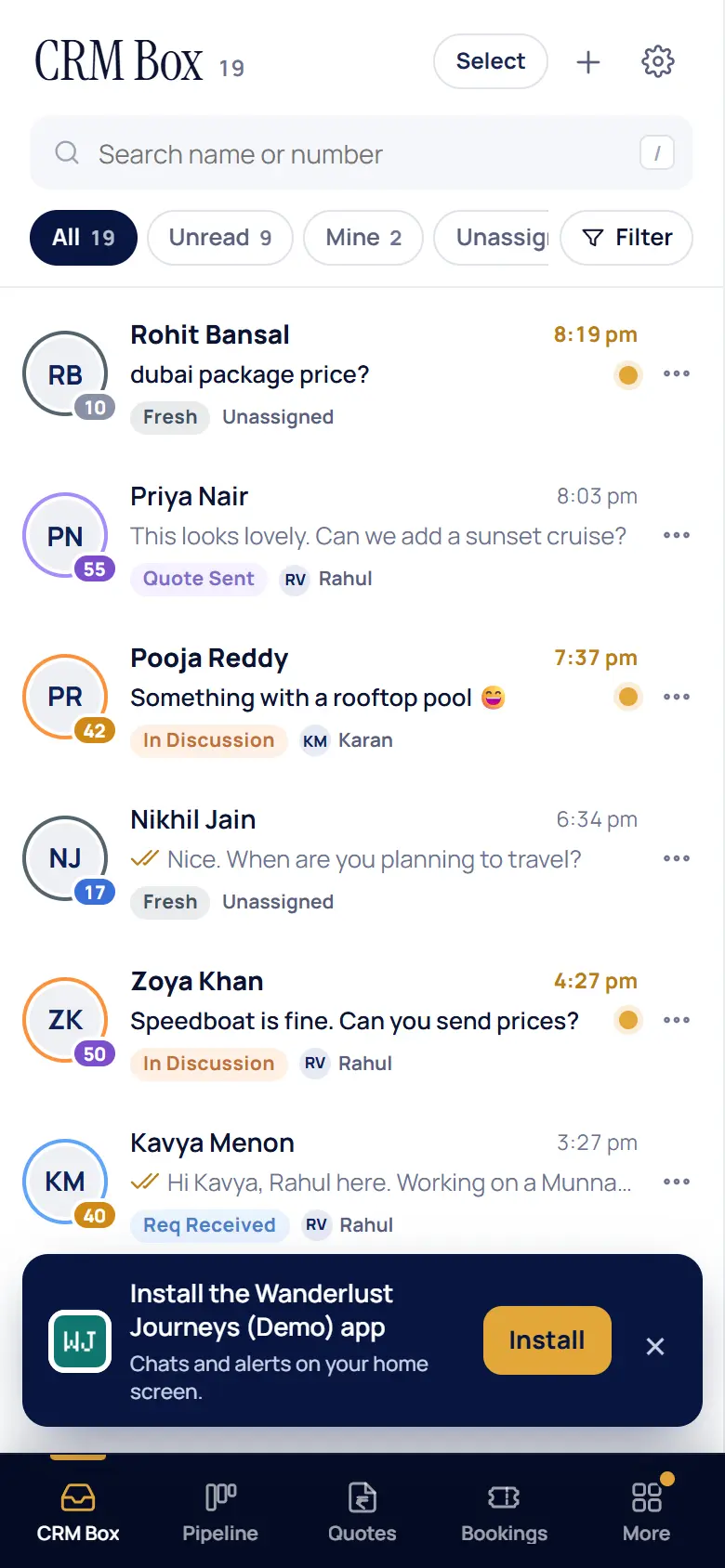
Your brand
Your agency’s name on every screen
Your logo and colours on the app, the quotes and the vouchers. Your team installs your agency’s own app on their phones, with push notifications.
- Team roles — Agency Admin, Manager and Executive, and who sees which leads
- One number, many agents — assign chats, leave private notes, hand over cleanly
- Move in easily — import contacts and leads from your old CRM or a spreadsheet
Pricing
Simple pricing, per agency
₹2,999 a month with 2 agents, the Briefer and the Lead Qualifier included. Everything you need to decide is on this page.
Includes 2 agents. Each additional agent ₹999 per month.
- CRM Box — your whole team on one WhatsApp number
- Lead Qualifier — 100 lead qualifications per agent per month
- The Briefer — every morning, what to do for each lead
- Leads pipeline, scoring, follow-ups and tasks
- Quotes, bookings, vouchers and GST export
- Analytics, team roles and your own branded app
Itinerary Generator
+ ₹200 per additional agent per month.
- Drafts day-wise itineraries and packages for your quotes
- Works from the destinations and packages in your Library
- 100 packages generated per agent per month
Added on top of Standard. Tick it in the calculator to see your total.
For larger agencies and custom needs
A big team, several branches, or a move from another system.
- Pricing for your team size
- Help moving leads and contacts from your current CRM
- Setting up the Qualifier and the Briefer with your team
Prices exclusive of GST. Included usage is per agent per month. WhatsApp conversation charges are billed to your agency by Meta directly.
Work out your monthly total
Your monthly total
/ month
- Standard, 2 agents included
- ₹2,999
- Additional agents × 0
- ₹0
- Itinerary Generator
- ₹500
Includes 200 lead qualifications a month.
Prices exclusive of GST. Paid to TripOps; WhatsApp charges are separate (see below).
For example: 2 agents ₹2,999 · 5 agents ₹5,996 · 10 agents ₹10,991 · 20 agents ₹20,981 per month on Standard.
The plan, in plain words
1 · What Standard gives you
Every module, 2 agents, ₹2,999 a month
One subscription for the agency. It covers the CRM Box, leads, quotes, bookings, vouchers, tasks, analytics and your branded app — plus the Briefer (a to-do list for every agent each morning) and the Lead Qualifier, with 100 lead qualifications per agent per month.
2 · What a “lead qualification” is
One new ad lead the Lead Qualifier talks to
When a new customer messages you from a click-to-WhatsApp ad, the Lead Qualifier greets them and asks about the trip — destination, dates, travellers, departure city, budget. That conversation is one qualification. It counts once, whether the customer answers every question (full) or only some of them (partial). Chats your team answers themselves never count.
3 · More people, and the add-on
₹999 per extra agent; the Itinerary Generator is optional
Each agent beyond the first 2 adds ₹999 a month and another 100 lead qualifications. The Itinerary Generator add-on drafts day-wise itineraries and packages for your quotes from your Library: ₹500 a month for the agency plus ₹200 per additional agent, with 100 packages per agent per month.
4 · If you reach a limit
Nothing is lost, and nothing extra is charged
When the month’s lead qualifications are used up, the Lead Qualifier stops starting conversations with new leads. Those customers still land in your CRM Box and your team answers them as usual; conversations it had already started carry on. The allowance starts again on the 1st of the next month. Need more? Talk to us — the allowance for your agency can be raised.
Worked example
An agency with 4 agents and the Itinerary Generator
- Standard, 2 agents included
- ₹2,999
- 2 additional agents × ₹999
- ₹1,998
- Itinerary Generator add-on
- ₹500
- 2 additional agents × ₹200
- ₹400
Monthly total₹5,897
Prices exclusive of GST. This agency gets 400 lead qualifications and 400 generated packages a month. WhatsApp charges, if any, are billed by Meta separately.
What you pay, and to whom
Bill 1 · paid to TripOps
Your TripOps subscription
The software for your whole team: the plan above, any additional agents and the add-on if you take it. Invoiced by TripOps. Prices exclusive of GST.
Bill 2 · paid to Meta
WhatsApp conversation charges
Automated replies, template messages and anything sent outside WhatsApp’s 24-hour window are charged by Meta at its own published rates, directly to the payment method on your WhatsApp Business Account. We never see that bill and take nothing from it.
No bill
Replies typed on the phone
When someone on your team answers from the WhatsApp Business app on the phone, Meta does not charge for it.
Try the live demo
A sample agency with fictional travellers — the same screens as above. Demo login details are available from our team.

Super-power your agency this week
Create your agency account, connect your WhatsApp number and put your team on it. Larger agency? Request a call back.